Welcome to my backyard
This is where I have been experimenting with something I care a lot about: how AI can move beyond a chatbot window and become part of a real personal workflow.
Over the last few months, I have been building a personal AI server around Hermes Agent, an open-source framework for running AI agents with tools, memory, profiles, scheduled jobs, and integrations across different platforms.
At first, the idea was simple. I did not want another tab where I could ask random questions. I wanted a system that could help me handle the messy, everyday context around work, research, career, finances, projects, and routines.
That idea eventually became a home lab: a self-hosted Hermes environment running on my own server, with a custom operational layer I call Mission Control.
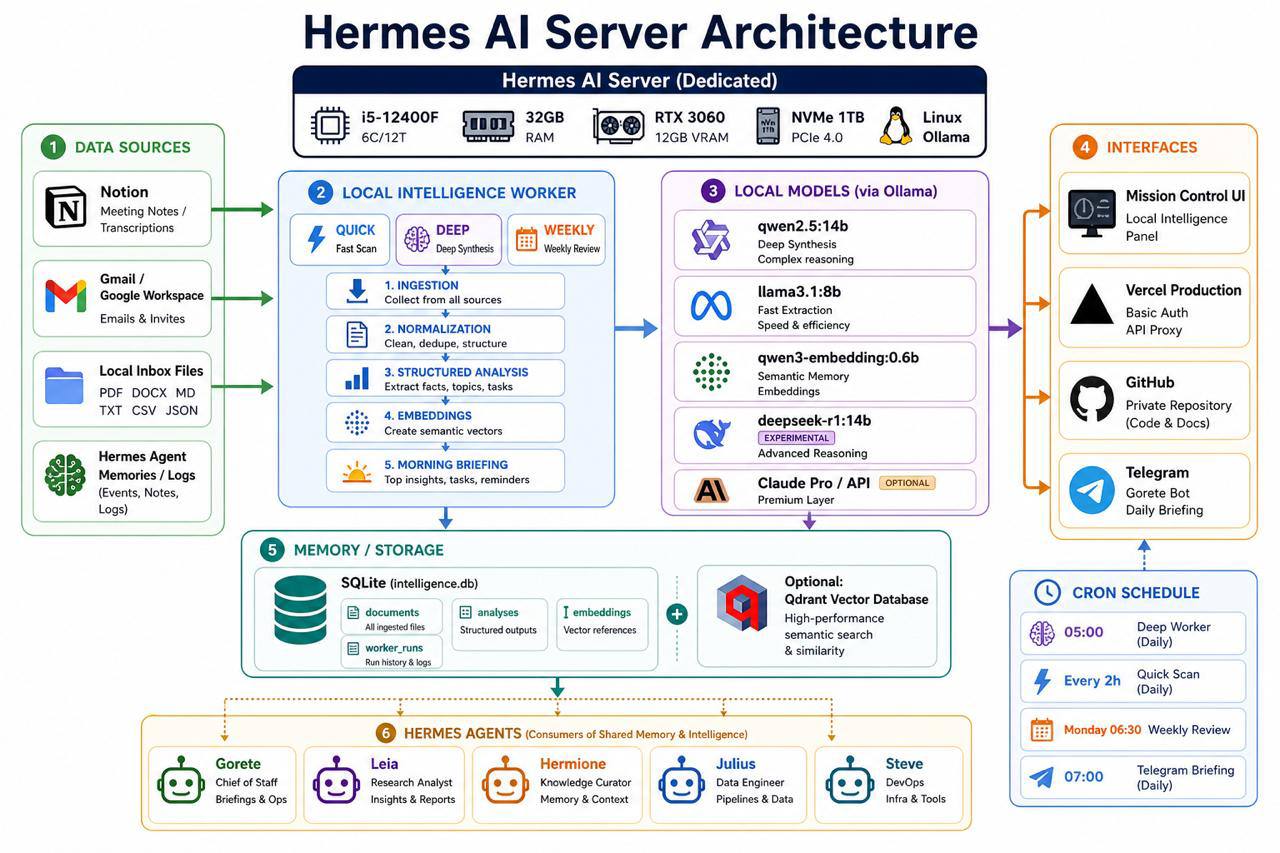
Figure 1 — A simplified view of my personal Hermes AI server architecture.
The real problem: too much context everywhere
The problem I wanted to solve was not “how can I use more AI?”
It was more practical than that.
My context was scattered across too many places:
- conversations in Telegram;
- notes and documents;
- ideas captured during the day;
- recurring tasks that needed follow-up;
- career monitoring, research, finance, and personal projects all competing for attention;
- decisions made in one place but needed later somewhere else.
I did not want to solve that by adding yet another productivity tool. I wanted a small system that could connect the pieces, remember useful context, trigger routines, and stay quiet when there was nothing important to say.
That last part is important. A good AI system should not behave like a notification machine. It should know when to act, when to ask, and when to disappear into the background.
What is running in the backyard
The server itself is a dedicated Linux machine running Hermes, local models through Ollama, scheduled jobs, storage, and a few interfaces around the system.
The architecture has a few main layers:
- data sources such as notes, local files, selected inboxes, and Hermes memories;
- a local intelligence worker that ingests, cleans, structures, and summarizes information;
- local models for embeddings, classification, fast extraction, and deeper synthesis;
- SQLite for persistence, runs, documents, analyses, and vector references;
- Telegram as the day-to-day interaction layer;
- Mission Control as the visual dashboard;
- specialized Hermes agents with different responsibilities.
The point was not to create a polished enterprise platform. The point was to build something real enough to expose the hard parts: routing, context, memory, permissions, reliability, noise, and handoff between humans and agents.
A clean demo can hide those problems. A running system cannot.
Specialized agents instead of one giant assistant
One decision I made early was to avoid one generic assistant for everything.
Instead, I split the system into specialized Hermes profiles. Each profile has a clearer role, its own context, and its own way of helping.
For example, I have agents focused on:
- orchestration, priorities, and daily briefings;
- productivity, projects, meetings, and follow-ups;
- research and analysis;
- finance routines;
- career, market monitoring, resumes, and interviews.
This separation makes the system much easier to reason about. A career opportunity should not be handled like a finance task. A project follow-up should not be mixed with a market alert. A daily briefing should not become a noisy stream of everything the system knows.
That may sound obvious, but it became one of the most useful lessons from the project: agent design is not just prompt design. It is boundary design.
Telegram is the front door
Telegram became the main interface because it is already part of my daily flow.
Instead of opening a dashboard every time I need something, I can interact with agents in threads and topics. Some messages are routed to specific agents. Some scheduled outputs are delivered to specific places. Some routines run in the background and only report back when there is something worth seeing.
That makes the system feel less like a separate app and more like an operational layer around how I already work.
A dashboard is great for visibility.
A chat interface is great for action.
I wanted both.
Mission Control
Mission Control is the visual layer I built around the Hermes environment.
It helps me see what is going on: which agents exist, what they are responsible for, what routines are configured, which projects are being tracked, and what the system has been doing recently.
The dashboard is intentionally visual. I wanted something I could glance at quickly, not another place where I had to read logs to understand whether the system was alive.
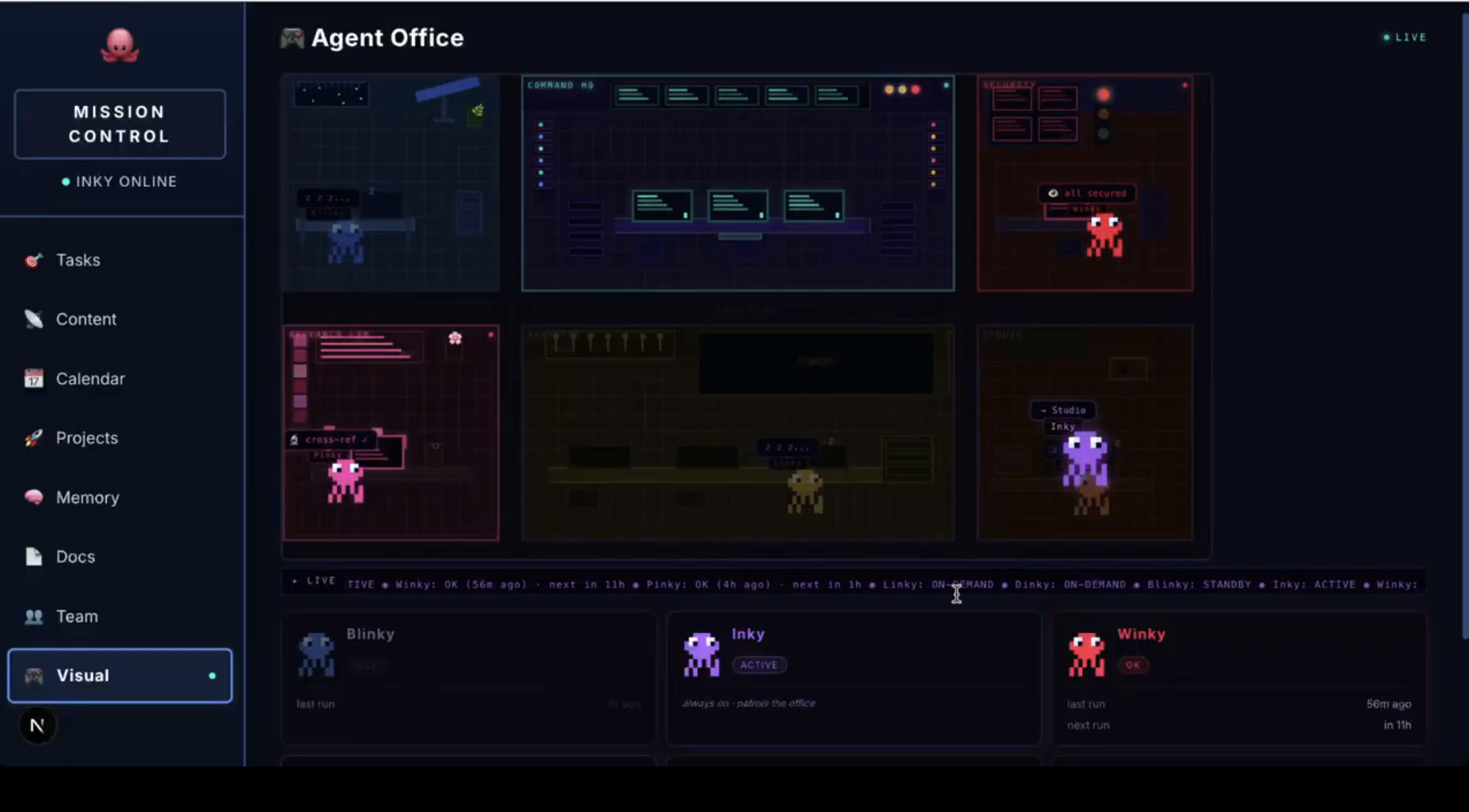
Figure 2 — Mission Control as a visual office: a lightweight way to see which agents are active, idle, or waiting for their next run.
It also gives me more operational views when I need them, such as content signals, scheduled routines, memory, project context, and agent responsibilities.
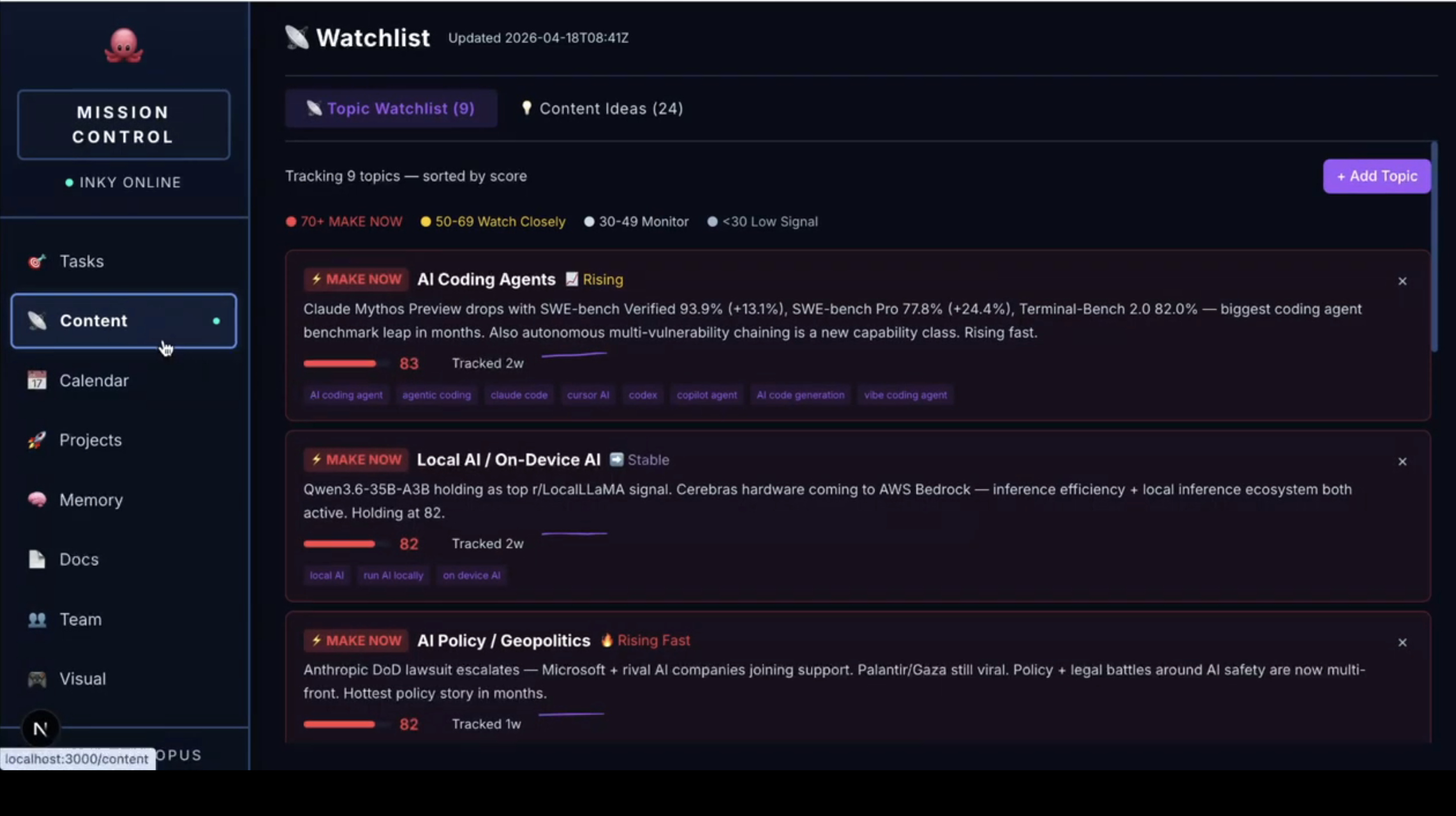
Figure 3 — A watchlist view that helps turn recurring signals into something easier to monitor and act on.
In practical terms, it helps answer questions like:
- Which agents are active or idle?
- What recurring routines are running?
- What projects or topics are being monitored?
- What documents or briefings were generated?
- What does the system need from me?
This changed how I think about AI agents. Once agents can take actions, remember context, and run on a schedule, observability becomes part of the product. You need to know what the system is doing, where it is acting, and why.
The local intelligence pipeline
Another important part of the setup is the local intelligence pipeline.
The pipeline takes selected sources, normalizes them, stores useful content, and generates structured outputs such as tasks, decisions, risks, people, projects, and briefings.
The basic flow looks like this:
- Information enters from notes, documents, memory files, logs, or controlled inbox folders.
- The system cleans and stores the content.
- Local models help classify, summarize, or extract structured information.
- The output becomes searchable and reusable by the broader Hermes environment.
- Briefings or alerts are generated when useful.
I have also been experimenting with embeddings and semantic search so the system can retrieve context in a better way than simple keyword matching.
This is where the project became especially interesting from a product management perspective. The hard part is not summarizing a document. The hard part is deciding which information deserves to become persistent context and which should be ignored.
Memory is only useful when it improves future decisions.
What is functional today
This is not just a drawing or an idea in a notebook. The system runs on my own server and supports real workflows.
Today, it can support:
- AI-assisted conversations through Telegram;
- specialized agents with separate responsibilities;
- scheduled routines and recurring briefings;
- career and market monitoring workflows;
- project and productivity follow-ups;
- local document and note processing;
- persistent memory across sessions;
- a Mission Control dashboard for visibility;
- experiments with local models and semantic memory.
Some parts are stable. Some parts are still experimental. That is part of the fun.
I use this project as a practical lab to understand where AI agents are useful, where they fail, and what kind of product structure makes them safer and more helpful.
What I learned as a Product Manager
The biggest lesson is that AI-assisted work is not just about generating text or code faster.
The real value appears when AI becomes part of a workflow:
- capturing context;
- clarifying ambiguous requests;
- turning ideas into requirements;
- identifying edge cases;
- preparing acceptance criteria;
- monitoring recurring signals;
- summarizing what changed;
- helping decide what should happen next.
Building this system also made the trade-offs very visible.
Too much automation creates noise. Too much memory creates clutter. Too many agents create confusion. Too little structure turns everything back into a chatbot.
The product challenge is to design the right boundaries: what the agent should know, what it can do, where it should act, and when it should ask for confirmation.
That is a much more interesting problem than prompt writing.
Why this matters
I see personal AI infrastructure as a useful way to explore the future of product and engineering work.
Not because everyone needs a server at home. Most people do not.
But because building one forces you to face the practical questions behind AI systems:
- How should context be stored?
- How should agents be separated?
- How should actions be reviewed?
- How should recurring routines be scheduled?
- How should the system explain itself?
- How do you avoid turning automation into noise?
Those questions are very close to the questions teams face when adding AI into real products.
This project gives me a place to test ideas, break assumptions, refine workflows, and think more clearly about AI-enabled products.
Final thought
The most interesting part of this project is not that it uses AI.
The interesting part is that it behaves like a product: it has users, workflows, constraints, failure modes, feedback loops, and roadmap decisions.
It is small enough for me to change quickly, but real enough to teach me something every time it breaks.
That is the kind of AI experimentation I enjoy most: not a perfect demo, but a working system in my own backyard, quietly getting more useful with every iteration.